PUBG: Playgrounds: My Deep Dive into the New Community Mode Hub
PUBG: Playgrounds makes custom modes easier to discover, share, and play through matchmaking, tags, search, and creator-friendly tools.
As a dedicated PUBG player who loves experimenting with custom matches, I've always felt a pang of frustration: creating a unique mode is one thing, but getting others to actually play it? That's a whole different battle. So when I heard about the August 2026 update introducing PUBG: Playgrounds, I couldn't help but ask myself—could this finally be the bridge between creators and players? After digging into the details, I'm convinced it is. This new hub is a game-changer for community-driven content, and I'm here to share everything I've learned.
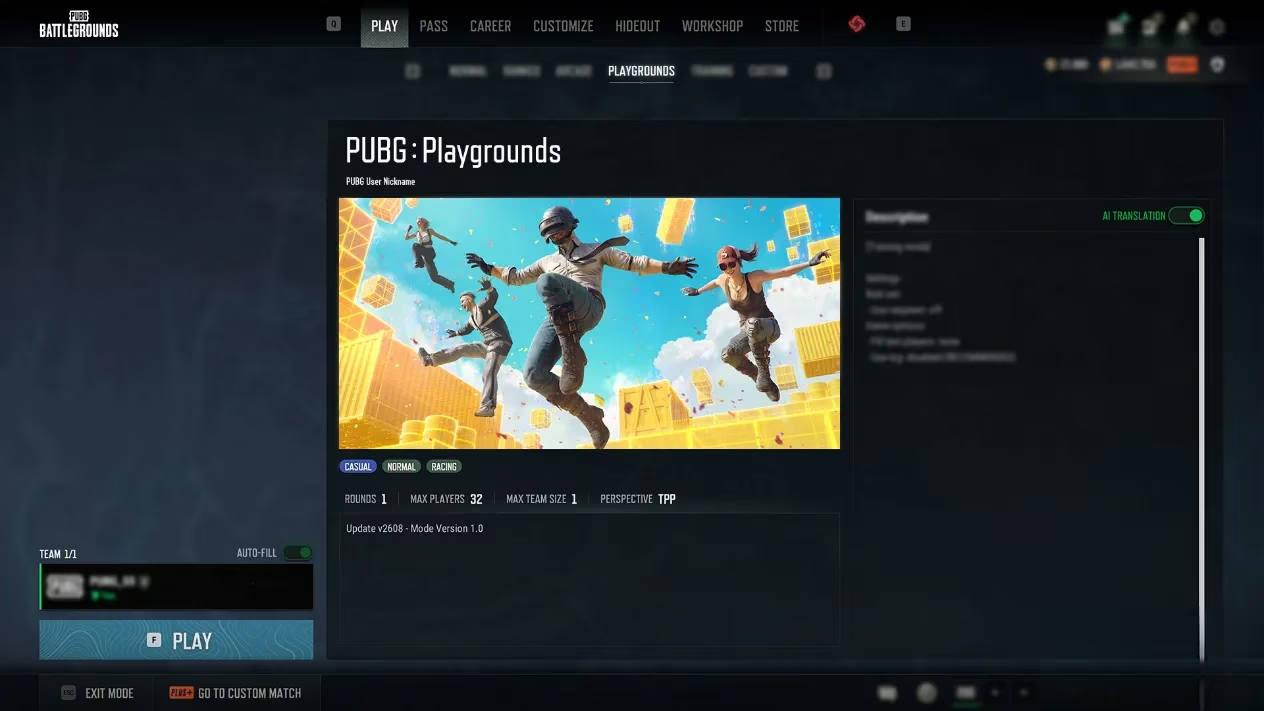
What Exactly Is PUBG: Playgrounds?
In short, it's a dedicated space where player-created modes get the spotlight they deserve. Previously, if you wanted to share your custom mode, you had to gather friends or spam Discord servers to fill a lobby. Browsing other players' creations was equally painful—like searching for a needle in a haystack. But PUBG: Playgrounds changes all that. Accessible through the [Play] menu on PC, it's a one-stop shop for discovering, browsing, and jumping into community-made modes via matchmaking. No more manual invites, no more empty lobbies. Just pure, unadulterated fun.
How Does It Work? A Quick Tour
When I first opened the Playgrounds menu, I was greeted by a clean, intuitive main page. Here's what I found:
-
Main Page Sections:
-
New: Recently added modes in randomized order (this section will appear as more modes are added).
-
Recently Played: Your personal history, with the most recent first.
-
All: Every available mode, shuffled for variety.
-
Search & Filters: You can search by mode name or creator name, and filter by primary tag. Hovering over the info icon reveals details like max players, team size, and tags.
-
Create Button: Takes you straight to the Custom Match room creation screen.
Selecting a mode opens its details page, where I could see the main image, mode name, tags, creator info, number of rounds, max players, team size, perspective, and update info. There's even an AI translation feature for descriptions in other languages—perfect for global discovery. Matchmaking from this page lasts up to 1 hour and 30 minutes, giving you plenty of time to gather your squad. One caveat: if you switch between a community mode and Normal/Ranked Mode, your party might disband if it exceeds the player limit. So plan accordingly!
Tags: The Secret Sauce for Discovery
I'll be honest—I've scrolled past countless custom modes because I had no idea what they were about. Tags fix that. Creators must choose one primary tag and can add up to two secondary tags. This simple system makes categorization a breeze. Whether you're into sniper duels, zombie survival, or racing, you can find your niche in seconds. And as a creator, setting the right tags means more eyes on your masterpiece. Why wouldn't you want that?
For Creators: How Your Mode Gets Featured
Now, here's the part that really piqued my interest. Unlike some platforms, PUBG: Playgrounds doesn't accept direct submissions—at least not yet. Instead, the developers select modes based on gameplay data collected from Custom Matches. So the more people play your mode in Custom Matches, the more data you accumulate. Developers monitor total playtime and average participation rate to identify popular modes. If your creation meets the criteria, it gets added to Playgrounds, where matchmaking exposes it to a much wider audience. They also source modes through community contests and other channels, so keep an eye out.
But wait—what if your mode is popular but violates some rules? The developers have clear exclusion criteria. Let me break them down:
| Exclusion Reason | Details |
|---|---|
| Violating content | Maps containing content that breaks the Rules of Conduct or Mods Policy |
| Critical bugs | Modes that prevent normal gameplay |
| Inappropriate text | Offensive or unsuitable language |
| Commercial links | Advertising, sponsorships, promotions, or personal social media/websites in descriptions |
| Clan info | Information about a clan the creator belongs to or operates |
| Other violations | Any other breach of the Rules of Conduct or Mods Policy |
Also, if your description contains any of those, the mode might remain available after you remove the offending content. So keep it clean!
A Few More Things I Learned
-
BATTLEGROUNDS PLUS Required: To create or join Custom Matches with player-created modes, you need a BATTLEGROUNDS PLUS account. However, matchmaking through Playgrounds is open to everyone—even if you haven't agreed to the Mods Policy. Nice touch for accessibility.
-
Thumbnails: If you don't set a thumbnail, an in-mode screenshot is used automatically. Not ideal, but better than nothing.
-
Settings Adjustments: If your mode gets selected, some settings like score limit or number of rounds may be tweaked for stability. Don't take it personally—it's for the greater good.
-
PC Only (For Now): PUBG: Playgrounds launches on PC with the August 2026 update. Console players, hang tight.
My Verdict: A Win for the Community
As I wrapped up my research, I couldn't help but feel a surge of excitement. PUBG: Playgrounds isn't just a new feature—it's a fundamental shift in how we experience player creativity. It answers the question: "How do we give amazing custom modes the audience they deserve?" By combining matchmaking, tags, and data-driven curation, the developers have created a system that rewards quality and effort. Sure, there are rules and restrictions, but that's necessary to keep things fun and fair.
So, what are you waiting for? Fire up PUBG, head to the Play menu, and dive into PUBG: Playgrounds. Whether you're a creator itching to see your mode in the spotlight or a player hungry for something fresh, this is your moment. And remember—every match you play in Custom Matches helps your favorite modes get discovered. So play, create, and share. The playground is open. 🎮🚀