Mastering BGMI's Three-Finger Claw Setup in 2026
Battlegrounds Mobile India three-finger claw setup boosts gameplay efficiency and ranks in 2026, surpassing thumb-only controls.
I’ve been grinding Battlegrounds Mobile India since its early days, and I can confidently say that in 2026, the three-finger claw setup remains one of the most effective control configurations for players who want to level up their gameplay. While thumb-only controls work for casual matches, they can’t compete against opponents who use multiple fingers to aim, move, and fire simultaneously. Over the years, I’ve tried almost every layout imaginable—four-finger, five-finger, even gyro-heavy hybrids—and I keep coming back to the three-finger claw. It’s the sweet spot between complexity and comfort.
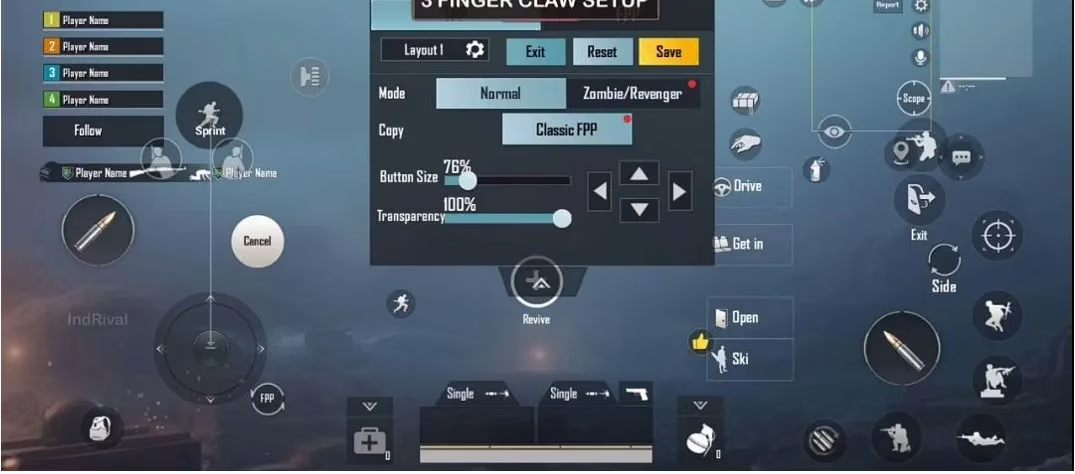
The default BGMI layout is designed for beginners who rely on their thumbs. It features large, opaque buttons that take up way too much screen space. Take a look at the standard layout below and you’ll notice how the fire button, jump, crouch, and other action keys dominate the display. This can seriously limit your view of the battlefield.
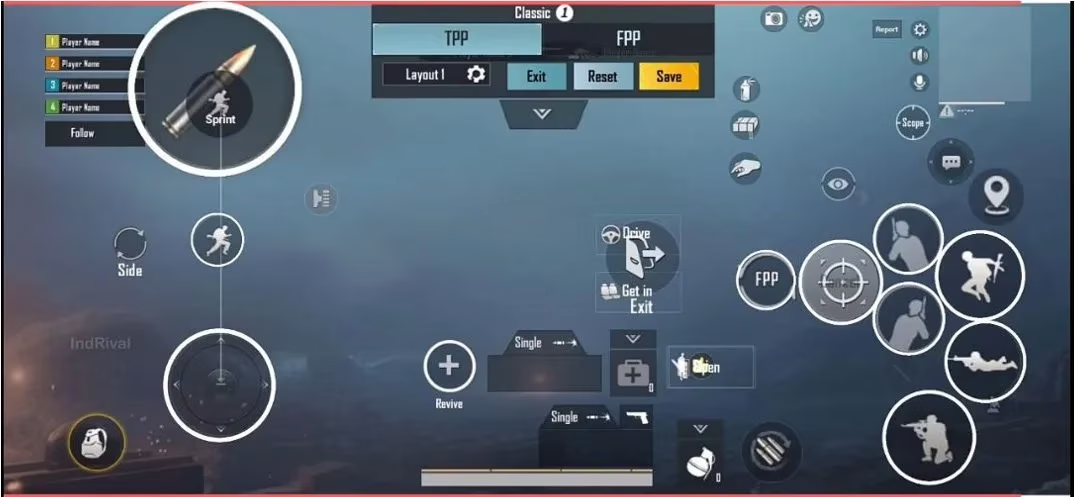
If you’re serious about pushing ranks in 2026, customizing your controls is absolutely necessary. I’ve seen players stuck in Diamond tier simply because they never adjusted their HUD. The first step in my three-finger claw journey was stripping down the unnecessary clutter. I removed buttons like leap and sprint—frankly, I rarely use them—and resized icons like the map and the player name palette, tucking them into the corners. This instantly opened up the central screen area.
Now, let’s talk about the actual finger assignment. In my setup, the left index finger is dedicated solely to firing. The left thumb handles movement—precise strafing and positioning are its job. The right thumb becomes the workhorse: it takes care of crouching, proning, jumping, directional peeking, opening scopes, reloading, and even quick messages. This split lets me fire while moving, jump-shot without ever lifting my thumb off the joystick, and scope-peek fluidly. The key is to place every button where your fingers naturally rest, not where the developers decided.
Testing is crucial. When I first transitioned to claw, I spent hours in Cheer Park’s training ground. This safe zone allows you to practice recoil control, quick scoping, and movement combinations without the pressure of ranked matches. I recommend starting with 10–15 minutes of drill each day: try spamming crouch while firing, then incorporate jumps and leans. Muscle memory takes time, but the improvement is real.
A question I often get asked is, “Should I skip straight to a four- or five-finger claw?” My answer in 2026 hasn’t changed: No. Jumping into advanced layouts too early leads to frustration and inconsistent performance. The three-finger setup builds the foundation. Once you’ve mastered it, you can gradually add a fourth finger for dedicated scope control or gyro adjustments. But for most players, three fingers are all you need to dominate.
To give you a clearer picture, here’s a quick breakdown of the two types of players who adopt the three-finger claw:
-
🎮 Players comfortable with three-finger claw: They’ve used this layout for months or years and have fine-tuned it over time. They might tweak button opacity or size seasonally, but the core structure stays the same.
-
🔄 Players transitioning from thumbs: They’re migrating from a two-thumb layout and need a systematic approach. For these players, I suggest copying a proven layout like the one I shared and then adjusting in small increments.
Here’s a simplified table that highlights the changes I made while shifting from default to claw:
| Element | Default Layout | My Three-Finger Claw |
|---|---|---|
| Fire button | Large, center-left (thumb-operated) | Moved top-left for left index finger |
| Crouch/Prone/Peek | Clustered at right | Grouped under right thumb for quick access |
| Map | Medium size, mid-top | Reduced and moved to extreme corner |
| Jump/leap | Present, often leads to accidental presses | Either removed or resized to minimal |
| Button transparency | ~70–80% (opaque) | Dropped to 30–40% for clearer vision |
One thing I’ve noticed lately: newer BGMI updates in 2025 and 2026 have added more sensitivity sliders and customizable touch zones, making claw control even smoother. If your device supports a high touch sampling rate, use it. A 720Hz or 960Hz touch response dramatically reduces input lag, which is vital when your right thumb is juggling five different actions.
Let’s not forget the mental aspect. Switching to claw can feel awkward for the first week. Your fingers will ache, your aim will wobble, and you’ll miss easy kills. Stick with it. I recall a squad mate who almost quit because he couldn’t get used to the layout. Two weeks later, he was clutching 1v4s with a DP-28 and a dream. Consistency beats talent every time.
I also prefer using in-game scrims rather than TDM for testing new setups. Classic mode provides realistic scenarios—loot pressure, vehicle fights, zone shifts—that TDM can’t replicate. After every match, review your deaths. Ask yourself: did I die because I fumbled a button? If yes, reposition that key slightly and try again.
In conclusion, the three-finger claw setup is not just a relic of PUBG Mobile’s past; it’s a timeless BGMI skill in 2026. Whether you’re a returning veteran or a fresh face inspired by the latest esports tournament, give this layout a chance. Start small, practice deliberately, and watch your gameplay transform. See you on the battlegrounds! 🏆